
Varnish Cache(反向网站快取服务器)
v3.0 官方版 发表评论
- 软件类别:服务器区
- 软件大小:2.45 MB
- 更新时间:2018-01-18 18:29
- 软件版本:v3.0 官方版
- 软件语言:中文
- 软件等级:
- 官方网址:暂无
评分:
好评:1
差评:0

软件介绍
Varnish cache是一款功能强大专业的高性能反向代理服务器和HTTP加速器的工具,帮助朋友轻松的进行http相关的加速服务器的建立,有需要这款反向代理服务器的朋友就来IT猫扑下载吧!
Varnish Cache功能特色
初步流支持,无论是在错过和通行证
压缩和解压缩的支持,包括缝合在一起
压缩ESI片段
插件(vmods)
改进的文件
参数的默认值
Varnishncsa现在有自定义日志格式的支持
Varnishlog,varnishncsa和varnishhist现在可以过滤掉的记录
匹配多个表达式。
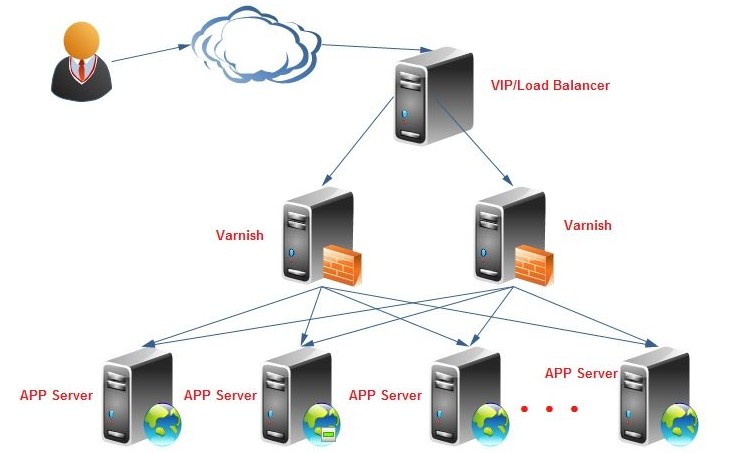
Varnish的结构特点
Varnish把数据存放在服务器的内存中,这种模式的效率是最高的,不过重启后数据会消失,官方透露3.0版本可以解决这个问题。Varnish可以设置0~60秒的精确缓存时间,不过32位的机器支持的缓存文件最大为2 GB。Varnish采用VCL的配置,而且具有强大的管理功能,如top、stat、admin、lis,所以管理方式比较灵活。Varnish的状态机设计不仅巧妙,结构也很清晰,利用二叉堆管理缓存文件,即可达到随时删除的目的。
与传统的Squid 相比,Varnish具有性能更高、速度更快、管理更加方便等诸多优点:
Varnish采用了“Visual Page Cache”技术,所有缓存的数据都直接从内存读取,而Squid从硬盘读取缓存的数据,它避免了Squid频繁在内存、磁盘中交换文件,性能要比Squid高。
Varnish稳定性比Squid高,宕机率很低。
通过Varnish管理端口,可以使用正则表达式快速、批量地清除部分缓存,这一点是Squid不能具备的。
Varnish Cache使用方法
如果您是 RedHat/centos 系统想安装 varnish,您需要安装以下软件包:
automake
autoconf
libtool
ncurses-devel
libxslt
groff
pcre-devel
pkgconfig
Varnish可以支持更多的并发连接。因为Varnish的TCP连接与释放比Squid快,所以在高并发连接情况下可以支持更多的TCP连接。
以下是在配置好 yum 包管理器的情况下运行
yum install -y automake autoconf libtool ncurses-devel libxslt groff pcre-devel pkgconfig
[root@node18 ~]# yum install -y automake autoconf libtool ncurses-devel libxslt groff pcre-devel pkgconfig
Loaded plugins: fastestmirror
Loading mirror speeds from cached hostfile
* base: mirrors.grandcloud.cn
* extras: mirrors.grandcloud.cn
* updates: mirrors.grandcloud.cn
Setting up Install Process
Package automake-1.9.6-2.3.el5.noarch already installed and latest version
Package autoconf-2.59-12.noarch already installed and latest version
Package libtool-1.5.22-7.el5_4.i386 already installed and latest version
Package ncurses-devel-5.5-24.20060715.i386 already installed and latest version
Package libxslt-1.1.17-4.el5_8.3.i386 already installed and latest version
Package groff-1.18.1.1-13.el5.i386 already installed and latest version
Package pcre-devel-6.6-6.el5_6.1.i386 already installed and latest version
Package 1:pkgconfig-0.21-2.el5.i386 already installed and latest version
Nothing to do
[root@node18 ~]#
下载varnish源代码并编译安装
mkdir varnish_setup
cd varnish_setup/
wget http://repo.varnish-cache.org/source/varnish-2.1.5.tar.gz
tar zxf varnish-2.1.5.tar.gz
cd varnish-2.1.5
./autogen.sh
./configure --prefix=/usr
make
cd bin/varnishtest && ./varnishtest tests/*.vtc # <== 这一步执行测试,很费时,可省略
cd ../.. # <=== 如果执行了测试,否则执行安装
make install
注意:本文的安装与默认安装不同
varnishd将被安装到 /usr/sbin/varnishd
配置文件 /usr/etc/varnish/default.vcl
下面是安装的详细记录:
[root@node18 ~]# mkdir varnish_setup
[root@node18 ~]# cd varnish_setup/
[root@node18 varnish_setup]# wget http://repo.varnish-cache.org/source/varnish-2.1.5.tar.gz
--2012-11-20 10:23:32-- http://repo.varnish-cache.org/source/varnish-2.1.5.tar.gz
正在解析主机 repo.varnish-cache.org... 194.31.39.155
Connecting to repo.varnish-cache.org|194.31.39.155|:80... 已连接。
已发出 HTTP 请求,正在等待回应... 200 OK
长度:1530856 (1.5M) [application/x-gzip]
Saving to: `varnish-2.1.5.tar.gz'
100%[======================================>] 1,530,856 51.2K/s in 20s
2012-11-20 10:23:53 (73.2 KB/s) - `varnish-2.1.5.tar.gz' saved [1530856/1530856]
[root@node18 varnish_setup]#
[root@node18 varnish_setup]# tar zxf varnish-2.1.5.tar.gz
[root@node18 varnish_setup]# cd varnish-2.1.5
[root@node18 varnish-2.1.5]# ls
aclocal.m4 config.guess depcomp install-sh Makefile.in varnishapi.pc.in
autogen.sh config.h.in doc lib man
bin config.sub etc LICENSE missing
ChangeLog configure include ltmain.sh README
compile configure.ac INSTALL Makefile.am redhat
[root@node18 varnish-2.1.5]#
[root@node18 varnish-2.1.5]# ./autogen.sh
+ aclocal
+ libtoolize --copy --force
+ autoheader
+ automake --add-missing --copy --foreign
+ autoconf
[root@node18 varnish-2.1.5]# ./configure --prefix=/usr
checking build system type... i686-redhat-linux-gnu
checking host system type... i686-redhat-linux-gnu
checking target system type... i686-redhat-linux-gnu
checking for a BSD-compatible install... /usr/bin/install -c
checking whether build environment is sane... yes
checking for gawk... gawk
checking whether make sets $(MAKE)... yes
checking for gcc... gcc
checking for C compiler default output file name... a.out
checking whether the C compiler works... yes
...
configure: creating ./config.status
config.status: creating Makefile
config.status: creating bin/Makefile
config.status: creating bin/varnishadm/Makefile
config.status: creating bin/varnishd/Makefile
config.status: creating bin/varnishlog/Makefile
config.status: creating bin/varnishhist/Makefile
config.status: creating bin/varnishncsa/Makefile
config.status: creating bin/varnishreplay/Makefile
config.status: creating bin/varnishstat/Makefile
config.status: creating bin/varnishsizes/Makefile
config.status: creating bin/varnishtest/Makefile
config.status: creating bin/varnishtop/Makefile
config.status: creating doc/Makefile
config.status: creating doc/sphinx/Makefile
config.status: creating etc/Makefile
config.status: creating include/Makefile
config.status: creating lib/Makefile
config.status: creating lib/libvarnish/Makefile
config.status: creating lib/libvarnishapi/Makefile
config.status: creating lib/libvarnishcompat/Makefile
config.status: creating lib/libvcl/Makefile
config.status: creating lib/libjemalloc/Makefile
config.status: creating man/Makefile
config.status: creating redhat/Makefile
config.status: creating varnishapi.pc
config.status: creating config.h
config.status: executing depfiles commands
[root@node18 varnish-2.1.5]# make
make all-recursive
make[1]: Entering directory `/root/varnish_setup/varnish-2.1.5'
Making all in include
make[2]: Entering directory `/root/varnish_setup/varnish-2.1.5/include'
make[2]: Nothing to be done for `all'.
make[2]: Leaving directory `/root/varnish_setup/varnish-2.1.5/include'
Making all in lib
make[2]: Entering directory `/root/varnish_setup/varnish-2.1.5/lib'
Making all in libvarnishcompat
make[3]: Entering directory `/root/varnish_setup/varnish-2.1.5/lib/libvarnishcompat'
if /bin/sh ../../libtool --tag=CC --mode=compile gcc -DHAVE_CONFIG_H -I. -I. -I../.. -I../../include -g -O2 -MT daemon.lo -MD -MP -MF &.deps/daemon.Tpo& -c -o daemon.lo daemon.c;
then mv -f &.deps/daemon.Tpo& &.deps/daemon.Plo&; else rm -f &.deps/daemon.Tpo&; exit 1; fi
mkdir .libs
gcc -DHAVE_CONFIG_H -I. -I. -I../.. -I../../include -g -O2 -MT daemon.lo -MD -MP -MF .deps/daemon.Tpo -c daemon.c -fPIC -DPIC -o .libs/daemon.o
...
mkdir .libs
gcc -g -O2 -o .libs/varnishsizes varnishsizes.o ../../lib/libvarnish/.libs/libvarnish.so -lrt -lnsl ../../lib/libvarnishcompat/.libs/libvarnishcompat.so ../../lib/libvarnishapi/.libs/libvarnishapi.so -lpcre -lm -lcurses -lpthread
creating varnishsizes
make[3]: Leaving directory `/root/varnish_setup/varnish-2.1.5/bin/varnishsizes'
make[3]: Entering directory `/root/varnish_setup/varnish-2.1.5/bin'
make[3]: Nothing to be done for `all-am'.
make[3]: Leaving directory `/root/varnish_setup/varnish-2.1.5/bin'
make[2]: Leaving directory `/root/varnish_setup/varnish-2.1.5/bin'
Making all in man
make[2]: Entering directory `/root/varnish_setup/varnish-2.1.5/man'
make[2]: Nothing to be done for `all'.
make[2]: Leaving directory `/root/varnish_setup/varnish-2.1.5/man'
Making all in etc
make[2]: Entering directory `/root/varnish_setup/varnish-2.1.5/etc'
make[2]: Nothing to be done for `all'.
make[2]: Leaving directory `/root/varnish_setup/varnish-2.1.5/etc'
Making all in doc
make[2]: Entering directory `/root/varnish_setup/varnish-2.1.5/doc'
Making all in sphinx
make[3]: Entering directory `/root/varnish_setup/varnish-2.1.5/doc/sphinx'
make[3]: Nothing to be done for `all'.
make[3]: Leaving directory `/root/varnish_setup/varnish-2.1.5/doc/sphinx'
make[3]: Entering directory `/root/varnish_setup/varnish-2.1.5/doc'
make[3]: Nothing to be done for `all-am'.
make[3]: Leaving directory `/root/varnish_setup/varnish-2.1.5/doc'
make[2]: Leaving directory `/root/varnish_setup/varnish-2.1.5/doc'
Making all in redhat
make[2]: Entering directory `/root/varnish_setup/varnish-2.1.5/redhat'
make[2]: Nothing to be done for `all'.
make[2]: Leaving directory `/root/varnish_setup/varnish-2.1.5/redhat'
make[2]: Entering directory `/root/varnish_setup/varnish-2.1.5'
make[2]: Nothing to be done for `all-am'.
make[2]: Leaving directory `/root/varnish_setup/varnish-2.1.5'
make[1]: Leaving directory `/root/varnish_setup/varnish-2.1.5'
[root@node18 varnish-2.1.5]#
[root@node18 varnish-2.1.5]# cd bin/varnishtest && ./varnishtest tests/*.vtc
# top TEST tests/a00000.vtc passed (0.001s)
# top TEST tests/a00001.vtc passed (0.001s)
# top TEST tests/a00002.vtc passed (0.001s)
# top TEST tests/a00003.vtc passed (0.001s)
# top TEST tests/a00004.vtc passed (0.001s)
# top TEST tests/a00005.vtc passed (0.001s)
# top TEST tests/a00006.vtc passed (0.001s)
# top TEST tests/a00007.vtc passed (0.001s)
# top TEST tests/a00008.vtc passed (1.806s)
# top TEST tests/a00009.vtc passed (0.256s)
# top TEST tests/a00010.vtc passed (0.002s)
# top TEST tests/b00000.vtc passed (0.757s)
# top TEST tests/b00001.vtc passed (0.675s)
# top TEST tests/b00002.vtc passed (0.683s)
...
# top TEST tests/v00023.vtc passed (0.575s)
# top TEST tests/v00024.vtc passed (0.587s)
# top TEST tests/v00025.vtc passed (0.673s)
# top TEST tests/v00026.vtc passed (0.590s)
# top TEST tests/v00028.vtc passed (0.581s)
# top TEST tests/v00029.vtc passed (1.310s)
# top TEST tests/v00030.vtc passed (0.585s)
# top Slowest test: tests/p00005.vtc 8.022s
# top Total tests run: 196
# top Total duration: 204.346s
[root@node18 varnishtest]#
[root@node18 varnishtest]# cd ../..
[root@node18 varnish-2.1.5]# make install
Making install in include
make[1]: Entering directory `/root/varnish_setup/varnish-2.1.5/include'
make[2]: Entering directory `/root/varnish_setup/varnish-2.1.5/include'
make[2]: Nothing to be done for `install-exec-am'.
test -z &/usr/include/varnish& || mkdir -p -- &/usr/include/varnish&
/usr/bin/install -c -m 644 'shmlog.h' '/usr/include/varnish/shmlog.h'
/usr/bin/install -c -m 644 'shmlog_tags.h' '/usr/include/varnish/shmlog_tags.h'
/usr/bin/install -c -m 644 'stat_field.h' '/usr/include/varnish/stat_field.h'
/usr/bin/install -c -m 644 'stats.h' '/usr/include/varnish/stats.h'
/usr/bin/install -c -m 644 'varnishapi.h' '/usr/include/varnish/varnishapi.h'
make[2]: Leaving directory `/root/varnish_setup/varnish-2.1.5/include'
make[1]: Leaving directory `/root/varnish_setup/varnish-2.1.5/include'
Making install in lib
...
Making install in redhat
make[1]: Entering directory `/root/varnish_setup/varnish-2.1.5/redhat'
make[2]: Entering directory `/root/varnish_setup/varnish-2.1.5/redhat'
make[2]: Nothing to be done for `install-exec-am'.
make[2]: Nothing to be done for `install-data-am'.
make[2]: Leaving directory `/root/varnish_setup/varnish-2.1.5/redhat'
make[1]: Leaving directory `/root/varnish_setup/varnish-2.1.5/redhat'
make[1]: Entering directory `/root/varnish_setup/varnish-2.1.5'
make[2]: Entering directory `/root/varnish_setup/varnish-2.1.5'
make[2]: Nothing to be done for `install-exec-am'.
/root/varnish_setup/varnish-2.1.5/install-sh -d -m 0755 /usr/var/varnish
test -z &/usr/lib/pkgconfig& || mkdir -p -- &/usr/lib/pkgconfig&
/usr/bin/install -c -m 644 'varnishapi.pc' '/usr/lib/pkgconfig/varnishapi.pc'
make[2]: Leaving directory `/root/varnish_setup/varnish-2.1.5'
make[1]: Leaving directory `/root/varnish_setup/varnish-2.1.5'
[root@node18 varnish-2.1.5]#
[root@node18 varnish-2.1.5]# whereis varnish
varnish: /usr/etc/varnish /usr/include/varnish
[root@node18 varnish-2.1.5]# whereis varnishd
varnishd: /usr/sbin/varnishd /usr/man/man1/varnishd.1
[root@node18 varnish-2.1.5]# ls /usr/etc/varnish/default.vcl
/usr/etc/varnish/default.vcl
[root@node18 varnish-2.1.5]#
下载地址
Pc版Varnish Cache(反向网站快取服务器) v3.0 官方版
本类推荐
 Microsoft Exchange Server 2010 SP2
 zend framework 1.10.2 核心版
 Apache Tomcat 7.0
 360主机卫士iis版
 花生壳动态域名解析
 iis6.0完整安装包
 啊D组件查询程序
 悬镜管家电脑端
本类最新
 北京时间v11.4.0
 开州看房网v1.1.7
 护卫神JSP大师v3.2 官方版
 纵横iis防盗链新云专用版v5.0 专业版
 Emby服务器v16.0.30530.185 绿色版
 XAMPP for Windowsv8.0.5.0 多国语言官方安装版
 开源脚本语言(PHP)v8.1.9 for Windows 32位/64位
 WampServer x64位(Apache服务器套装)v3.1.7 官方安装版
 iis7服务器管理v2.1.9 官方版
- PHP环镜windows版32位v8.1.8 官方最新版
 Nginx稳定版v1.23.0 官方版
 VNC Server for Windowsv6.9.0 官方安装版
 vnc enterprise edition汉化版(含注册码)v4.2.9 中文安装版
 宝塔Windows面板v7.5.0 官方最新版
- 宝塔面板手动版v7.5.0 免费版
相关软件
 nitrado方舟服务器免费版v5.4.8
Nitradoapp中文版是专为明日方舟玩家打造的一款私人稳定服务器软件,你可以通过app进行线上购买自己专属的私人服务器,可以支持云端数据存储,实时保存你的游戏数据,购买服务器之后你可以非常自由的管理自己的游戏,喜欢的朋
- Nginx稳定版v1.23.0 官方版
Nginx稳定版是一款由俄罗斯程序员IgorSysoev所开发轻量级的网页服务器、主要它还是开源的,我们可以添加代码达到自己想要的效果,温馨提示,如果您是用windows作服务器的话,还是建议用iis配置webNginx稳定版的优点Nginx可以
 The Bat! Pro Edition(免费邮件客户端)v9.3.4.0 最新版
TheBat!ProEdition是一个强大易用的E-mail客户程序,支持多用户环境,不受限制的E-mail帐号的安全和非安全的消息访问,全面的消息过滤,多语种界面,MIME标准和UUEncode,带消息模板的相当不错的文本编辑器,以及其他很多小的实用
 ksweb建站服务器完整版v3.986
KSWEB汉化破解版是一款可以支持安卓手机建站的手机软件,安装使用该软件可以将你的手机变成一个开源的服务器,是不是很牛x,该版本已经汉化,各位可以轻松使用!欢迎有需要的用户前来it猫扑下载!KSWEB建站服务器说明KSWEB是由俄
下载排行
- 1ccproxy免注册码

服务器区 / 6.27 MB - 2SmartServer(基于NetBox)

服务器区 / 621.00 KB - 3SQL Server 2005

服务器区 / 36.00 MB - 4cvs服务器

服务器区 / 3.70 MB - 5方配网站服务器(FPWebServer)

服务器区 / 5.20 MB - 6winwebmail企业邮箱

服务器区 / 8.48 MB - 7IIS 7.0独立安装包

服务器区 / 175.00 MB - 8IIS日志工具(Advanced Logging for IIS)

服务器区 / 56.00 KB - 9xampp(PHP5.3+5.6+7.0)

服务器区 / 31.50 MB - 10bitvise ssh server(最好用的winsshd)

服务器区 / 19.00 MB




网友评论
查看所有0条评论