
PNG批量压缩工具OptiPNG
v0.7.7 官方绿色版 发表评论
- 软件类别:图像处理
- 软件大小:2.62 MB
- 更新时间:2019-01-09 17:33
- 软件版本:v0.7.7 官方绿色版
- 软件语言:中文
- 软件等级:
- 官方网址:暂无
评分:
好评:1
差评:0
软件介绍
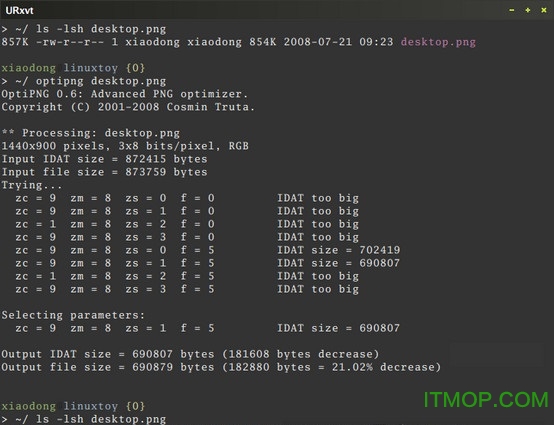
OptiPNG是一款专业且功能强大的PNG格式批量压缩软件,在这里用户可以直接将图片拖到对应的图标出即可,软件操作简单,支持多种格式的图片转换,软件还可以降低图片的体积,欢迎有需要的用户来IT猫扑下载!
软件简介
可使用下列命令来安装 Optipng:
Debian/Ubuntu:$ sudo apt-get install optipng
Fedora:# yum install optipng
Archlinux:# pacman -S optipng
Optipng 是一个命令行的软件,此外有第三方利用该软件开发的图形化工具 Optipng-UI(只支持Windows)和 Punig
可以 man optipng 详细了解 Optipng 的优化参数。
值得一提的是,Optipng 也可以将其他图像格式 (如 bmp、gif、tiff) 转换成已优化的 PNG 图像。

使用方法
快速批量压缩png格式图片的工具,使用方法非常简单
解压后,将要压缩的png图片拖动至图标上等待即可!支持批量任务哦!(一次拖几个)
版本更新
* Upgraded libpng to version 1.4.5-optipng [private]
* Upgraded zlib to version 1.2.5-optipng [private]
!! Fixed the I/O states (in libpng 1.4.5);
they caused incorrect file reads in some rare cases.
(Thanks to [M*A*S*H] and Dmitry Marakasov for the report.)
!! Fixed processing of PNG files with chunks of size 0.
(Thanks to Matthew Fearnley for the report.)
! Fixed a display error in the TIFF import.
(Thanks to Piotr Bandurski for the fix.)
+ Improved checking of the arguments of -f, -zc, -zm and -zs.
- Removed quirks from the rangeset option argument syntax.
! Fixed a build issue under the system-supplied libpng-1.4.
(Thanks to Petr Gajdos for the fix.)
* Resolved forward-compatibility issues regarding libpng-1.5;
however, the system-supplied libpng-1.5 is not yet supported.
* Added various enhancements to the configure+make build system.
(Thanks in part to Elias Pipping and Dmitri Zubko.)
多平台下载
Pc版PNG批量压缩OptiPNG v0.7.7 官方绿色版
猜你喜欢
图片压缩软件

图片压缩软件
大家在逛微博、微信聊天的时候肯定会有保存图片的习惯,久而久之,内存是不足以负荷的,所以这时图片压缩工具就能及时解决这个难题,小编为大家整合的一些图片压缩软件大全都是非常实用的,帮助你轻松处理图片尺寸大小规格,减少大量图片占用内存...



本类推荐
 Teorex Inpaint(图片去水印工具)
 FastStone Photo Resizer(成批图像缩放工具)
 可牛影像(图片处理软件)
 最好用的抠图软件(Picture Cutout Guide)
 Adobe Illustrator CS5
 iSee图片专家
 Adobe Illustrator CS4(ai软件)
 光影魔术手
光影魔术手 Easy Paint Tool SAI(漫画绘画软件)
网友评论
本类最新
 绘画助手(数位漫画辅助软件)
 BeautyPlus_超级美颜 绿化版v7.9.2
 Framelapse 相机2.11.7
 美图秀秀PC电脑版客户端v10.21.0 电脑版
 Photoshop CS2破解版(含注册码)v9.2.0 免费版
 photoshop 6.0简体中文安装版附序列号
 Adobe Photoshop CS5 Extended(ps5软件)v12.0.2 多国语言绿色精简版
 reshade汉化版v4.9.1 绿色版
 photoshop cc2017v18.0 中文绿色版
 Adobe Photoshop CC 2017茶末余香增强版v18.1.1.252完整安装版
 adobe photoshop cc 2017破解版v18.0.0 简体中文免费版
 Adobe Photoshop CC 2018绿色便携版v19.0.0 免登陆授权版
 Adobe Photoshop CC2019破解版v20.0 中文破解版
 Photoshop 2020中文精简版v21.0.0.37 直装破解版
 PhotoShop CC 2019 Litev20.0 终极精简版
相关软件
 图片压缩王appv2.1.3
图片压缩王app是很实用的安卓手机压缩软件,可以在保证图片质量的同时进行压缩,另外还支持图片格式转换、自由裁剪、等比缩放等,软件内置证件照制作功能,可以很方便的更换背景底色,各种尺寸都能制作!软件介绍图片压缩王,批量
 小丸图片压缩工具最新版v1.1.8
小丸图片压缩工具app中用户带来一个强大的压缩工具软件,为的就是方便用户将一些大的视频的文件进行缩小,方便存储,操作上非常的简单,而且还可以进行视频格式转换,音频的压缩,非常好用的一个工具!应用描述小丸图片压缩工具提
 Imagine(图片大小批量压缩器)v1.1.3.0 中文免费版
Imagine绿色版是打开就能直接使用的图片大小批量压缩器,你可以自己调整比例进行压缩,小巧方便实用的图片压缩软件,快来IT猫扑下载吧!Imagine介绍Imagine提供图片大小设置功能,可以在软件帮助用户修改图片大小,利用内置的压
 图片压缩大师手机版v1.3.1
图片压缩大师安卓版是一款高效实用的图片压缩软件,高像素大图像很占手机内存,可以使用这款软件进行图片压缩,自定义压缩质量、尺寸,在确保照片质量的同时缩小图片体积,方便保存,有需要的朋友不要错过哦!图片压缩大师手机版介
下载排行
- 1Adobe Illustrator CS6

图像处理 / 217.11 MB - 2photoshop cc2017
图像处理 / 249.84 MB - 3OriginLab OriginPro 9.0 SR2 汉化破解版

图像处理 / 180.00 MB - 4photoshop cc 64位

图像处理 / 172.00 MB - 5autocad2014纯净绿色版

图像处理 / 254.80 MB - 6南方cass9.0完美破解版(含教程)

图像处理 / 34.33 MB - 7Adobe Photoshop CC 2019绿色版

图像处理 / 294.45 MB - 8smartdraw2012汉化破解版

图像处理 / 48.25 MB - 9coreldraw x7 64位绿色破解版

图像处理 / 467.00 MB - 10Adobe Photoshop CS5 Extended(ps5软件)
图像处理 / 120.52 MB


支持 (71 ) 回复