
windows server 2008 r2
简体中文版 发表评论
- 软件类别:操作系统
- 软件大小:3.13 GB
- 更新时间:2016-12-08 16:14
- 软件版本:简体中文版
- 软件语言:中文
- 软件等级:
- 官方网址:http://www.microsoft.com/zh/cn/
评分:
好评:3
差评:23
软件介绍
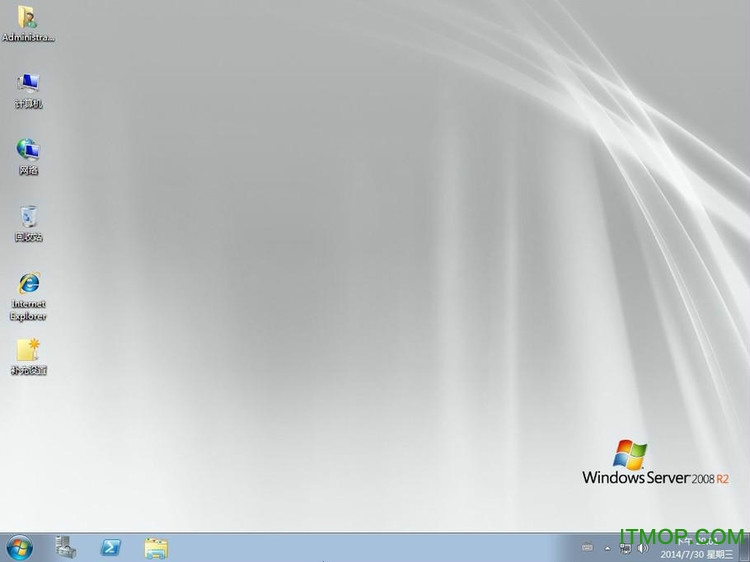
windows 2008r2是Microsoft Windows Server 2008 R2官方原版映像文件,即MSDN版.Windows Server 2008 R2在Windows Server 2008原有基础上新增了一些功能,服务器的灵活性更强大更稳定,本次小编为大家带来官方64位操作系统及安装教程,有需要的用户欢迎来IT猫扑网下载~
windows server 2008 r2简介
以下下载均为微软官方原版光盘映像文件,即MSDN版。包括零售版(RTL Edition)和大客户版(VOL Edition),请大家根据需要选择下载。提醒大家:下载完成后请验证文件的MD5/SHA1值,以保证文件的完整性。
Windows Server 2008 R2 Standard, Enterprise, Datacenter, and Web (x64) - DVD (Chinese-Simplified)
cn_windows_server_2008_r2_standard_enterprise_datacenter_web_x64_dvd_x15-50360.iso (3.05 GB)
语言:中文(简体)- RTL Edition (零售版) -
文件名:cn_windows_server_2008_r2_stan...terprise_datacenter_web_x64_dvd_x15-50360.iso
发布日期(UTC):2009-8-31 10:22:24文件大小:3270336512 字节
SHA1:7C17D854640EDDBF080390F3EFBF108F43BA7F09
下载地址:ed2k://|ed2k://|file|cn_windows_server_2008_r2_standard_enterprise_datacenter_and_web_with_sp1_vl_build_x64_dvd_617396.iso|3368962048|7C210CAC37A05F459758BCC1F4478F9E|/|ed2k://|file|cn_windows_server_2008_r2_standard_enterprise_datacenter_and_web_with_sp1_x64_dvd_617598.iso|3368839168|D282F613A80C2F45FF23B79212A3CF67|/|ed2k://|file|cn_windows_server_2008_r2_standard_enterprise_datacenter_and_web_with_sp1_vl_build_x64_dvd_617396.iso|3368962048|7C210CAC37A05F459758BCC1F4478F9E|/|ed2k://|file|cn_windows_server_2008_r2_standard_enterprise_datacenter_and_web_with_sp1_vl_build_x64_dvd_617396.iso|3368962048|7C210CAC37A05F459758BCC1F4478F9E|/||file|cn_windows_server_2008_r2_standard_enterprise_datacenter_and_web_with_sp1_vl_build_x64_dvd_617396.iso|3368962048|7C210CAC37A05F459758BCC1F4478F9E|/" target="_blank" style="color: rgb(42, 120, 180); text-decoration: none;">ed2k://|file|cn_windows_server_2008_r2_standard_enterprise_datacenter_and_web_with_sp1_vl_build_x64_dvd_617396.iso|3368962048|7C210CAC37A05F459758BCC1F4478F9E|/|/" target="_blank" style="color: rgb(42, 120, 180); text-decoration: none;">ed2k://|ed2k://|file|cn_windows_server_2008_r2_standard_enterprise_datacenter_and_web_with_sp1_x64_dvd_617598.iso|3368839168|D282F613A80C2F45FF23B79212A3CF67|/|ed2k://|file|cn_windows_server_2008_r2_standard_enterprise_datacenter_and_web_with_sp1_vl_build_x64_dvd_617396.iso|3368962048|7C210CAC37A05F459758BCC1F4478F9E|/||||3368839168|D282F613A80C2F45FF23B79212A3CF67|/" target="_blank" style="color: rgb(42, 120, 180); text-decoration: none;">ed2k://|file|cn_windows_server_2008_r2_standard_enterprise_datacenter_and_web_with_sp1_x64_dvd_617598.iso|3368839168|D282F613A80C2F45FF23B79212A3CF67|/|ed2k://|file|cn_windows_server_2008_r2_standard_enterprise_datacenter_and_web_with_sp1_x64_dvd_617598.iso|3368839168|D282F613A80C2F45FF23B79212A3CF67|/||3368839168|D282F613A80C2F45FF23B79212A3CF67|/|ed2k://|file|cn_windows_server_2008_r2_standard_enterprise_datacenter_and_web_with_sp1_x64_dvd_617598.iso|3368839168|D282F613A80C2F45FF23B79212A3CF67|/||3368839168|D282F613A80C2F45FF23B79212A3CF67|/" target="_blank" style="color: rgb(42, 120, 180); text-decoration: none;">ed2k://|file|cn_windows_server_2008_r2_standard_enterprise_datacenter_and_web_with_sp1_x64_dvd_617598.iso|3368839168|D282F613A80C2F45FF23B79212A3CF67|/|ed2k://|file|cn_windows_server_2008_r2_standard_enterprise_datacenter_and_web_with_sp1_x64_dvd_617598.iso|3368839168|D282F613A80C2F45FF23B79212A3CF67|/|/" target="_blank" style="color: rgb(42, 120, 180); text-decoration: none;">ed2k://|||||/||||||/" target="_blank" style="color: rgb(42, 120, 180); text-decoration: none;">ed2k://|||||/|||cn_windows_server_2008_r2_standard_enterprise_datacenter_and_web_with_sp1_vl_build_x64_dvd_617396.iso|3368962048|7C210CAC37A05F459758BCC1F4478F9E|/" target="_blank" style="color: rgb(42, 120, 180); text-decoration: none;">ed2k://||cn_windows_server_2008_r2_standard_enterprise_datacenter_and_web_with_sp1_vl_build_x64_dvd_617396.iso|3368962048|7C210CAC37A05F459758BCC1F4478F9E|/|||cn_windows_server_2008_r2_standard_enterprise_datacenter_and_web_with_sp1_vl_build_x64_dvd_617396.iso|3368962048|7C210CAC37A05F459758BCC1F4478F9E|/" target="_blank" style="color: rgb(42, 120, 180); text-decoration: none;">|/" target="_blank" style="color: rgb(42, 120, 180); text-decoration: none;">ed2k://||||||/" target="_blank" style="color: rgb(42, 120, 180); text-decoration: none;">ed2k://||cn_windows_server_2008_r2_standard_enterprise_datacenter_and_web_with_sp1_x64_dvd_617598.iso|3368839168|D282F613A80C2F45FF23B79212A3CF67|/|||||3368839168|D282F613A80C2F45FF23B79212A3CF67|/" target="_blank" style="color: rgb(42, 120, 180); text-decoration: none;">ed2k://|file|cn_windows_server_2008_r2_standard_enterprise_datacenter_and_web_with_sp1_x64_dvd_617598.iso|3368839168|D282F613A80C2F45FF23B79212A3CF67|/|ed2k://|file|cn_windows_server_2008_r2_standard_enterprise_datacenter_and_web_with_sp1_x64_dvd_617598.iso|3368839168|D282F613A80C2F45FF23B79212A3CF67|/|||||/" target="_blank" style="color: rgb(42, 120, 180); text-decoration: none;">ed2k://|||3368839168|D282F613A80C2F45FF23B79212A3CF67|/||file|cn_windows_server_2008_r2_standard_enterprise_datacenter_and_web_with_sp1_vl_build_x64_dvd_617396.iso|3368962048|7C210CAC37A05F459758BCC1F4478F9E|/" target="_blank" style="color: rgb(42, 120, 180); text-decoration: none;">ed2k://|file|cn_windows_server_2008_r2_standard_enterprise_datacenter_and_web_with_sp1_vl_build_x64_dvd_617396.iso|3368962048|7C210CAC37A05F459758BCC1F4478F9E|/|||/" target="_blank" style="color: rgb(42, 120, 180); text-decoration: none;">ed2k://|ed2k://|file|cn_windows_server_2008_r2_standard_enterprise_datacenter_and_web_with_sp1_x64_dvd_617598.iso|3368839168|D282F613A80C2F45FF23B79212A3CF67|/|cn_windows_server_2008_r2_standard_enterprise_datacenter_and_web_with_sp1_vl_build_x64_dvd_617396.iso|3368962048|7C210CAC37A05F459758BCC1F4478F9E|/|cn_windows_server_2008_r2_standard_enterprise_datacenter_web_x64_dvd_x15-50360.iso|3270336512|994401AF40CF454135F4F9510829405D|/
Windows Server 2008 R2 Standard, Enterprise, Datacenter, and Web with Service Pack 1 (x64) - DVD (Chinese-Simplified)
|||3368839168|D282F613A80C2F45FF23B79212A3CF67|/" target="_blank" style="color: rgb(42, 120, 180); text-decoration: none;">ed2k://|file|cn_windows_server_2008_r2_standard_enterprise_datacenter_and_web_with_sp1_x64_dvd_617598.iso|3368839168|D282F613A80C2F45FF23B79212A3CF67|/ (3.14 GB)
语言:中文(简体)
文件名:cn_windows_server_2008_r2_stan...atacenter_and_web_with_sp1_x64_dvd_617598.iso
发布日期(UTC):2011-2-21 8:33:49文件大小: 字节
SHA1:38BFF8DA3BEAA742ECA54A6F584403BD253444B5
下载地址:ed2k://||cn_windows_server_2008_r2_standard_enterprise_datacenter_and_web_with_sp1_x64_dvd_617598.iso|336883916
Windows Server 2008 R2 Standard, Enterprise, Datacenter, and Web, VL Build (x64) - DVD (Chinese-Simplified)
cn_windows_server_2008_r2_standard_enterprise_datacenter_web_vl_build_x64_dvd_x15-59777.iso (3.05 GB)
语言:中文(简体)- VOL Edition (批量授权版) -
文件名:cn_windows_server_2008_r2_stan...datacenter_web_vl_build_x64_dvd_x15-59777.iso
发布日期(UTC):2009-8-23 22:16:00文件大小:3270465536 字节
SHA1:7014D81CD17EE40E9A2A6F48D864B9CD2B6A3730
下载地址:ed2k://|file|cn_windows_server_2008_r2_standard_enterprise_datacenter_web_vl_build_x64_dvd_x15-59777.iso|3270465536|1C7FDB37C0CEC1765A52CD49B2227CBE|/
Windows Server 2008 R2 Standard, Enterprise, Datacenter, and Web with Service Pack 1, VL Build (x64) - DVD (Chinese-Simplified)
cn_windows_server_2008_r2_standard_enterprise_datacenter_and_web_with_sp1_vl_build_x64_dvd_617396.iso (3.14 GB)
语言:中文(简体)
文件名:cn_windows_server_2008_r2_stan..._and_web_with_sp1_vl_build_x64_dvd_617396.iso
发布日期(UTC):2011-2-21 8:33:50文件大小:3368962048 字节
SHA1:A92C97C38EF6ED5F827637179052AD218900377A
下载地址:ed2k://|file|cn_windows_server_2008_r2_standard_enterprise_datacenter_and_web_with_sp1_vl_build_x64_dvd_617396.iso|336
最后是微软提供的MD5/SHA1校验工具:Microsoft File Checksum Integrity Verifier,其实跟其他的校验工具没什么区别,如果有其他的校验工具就不用下载了。
Helvetica, 宋体; font-size: 14px; white-space: normal;">Windows Server 2008 R2相当于是Windows7的服务器版本,而Windows Server 2008 相当于是Windows Vista的服务器版本。类似于windows 2003是Windows XP的服务器版本。
在使用习惯上,Windows Server 2008 R2与Windows 7一致,而Windows Server 2008和Windows Vista一致。
目前推荐直接安装Windows Server 2008 R2。微软官方的介绍页面:http://www.microsoft.com/china/windowsserver2008/editions.aspx
<span http:=&& www.itmop.com=&& k=&& weiruanyahei=&& &=&& target=&_blank&>微软雅黑&>Windows Server 2008 R2 With SP1 64位简体中文VOL版
文件名 cn_windows_server_2008_r2_standard_enterprise_datacenter_and_web_with_sp1_vl_build_x64_dvd_617396.iso
发布日期 (UTC): 2/21/2011 8:33:50 AM 上次更新日期 (UTC): 2/23/2011 11:47:45 AM
SHA1: A92C97C38EF6ED5F827637179052AD218900377A ISO/CRC: B8F854DF
Windows Server 2008 R2 With SP1 64位简体中文Retail版
文件名 cn_windows_server_2008_r2_standard_enterprise_datacenter_and_web_with_sp1_x64_dvd_617598.iso
发布日期 (UTC): 2/21/2011 8:33:49 AM 上次更新日期 (UTC): 2/23/2011 11:43:07 AM
SHA1: 38BFF8DA3BEAA742ECA54A6F584403BD253444B5 ISO/CRC: 31ADD61F
Windows Server 2008 R2的激活破解可用
Windows 7Loader v2.0.0 By DAZ 下载地址:https://www.itmop.com/downinfo/6516.html
下载地址
Pc版windows server 2008 r2 简体中文版
本类推荐
 Windows Server 2016
 centos6.4镜像(Linux操作系统)
 Win10pe全能完整版
 deepin linux操作系统
 中标麒麟服务器操作系统
 Ubuntu 12.10
 Windows 98 SE 中文第二版ISO镜像
 bochs xp精简镜像
 win7旗舰版镜像文件
 Windows 7 Home Basic x86(家庭普通版)
网友评论
本类最新
 Windows11安装助手
 超级终端win10专用版
 装机猫一键重装系统v1.0.0.2免费版
- Windows XP SP3纯净装机版个人专用版
- Ghost XP SP3系统v10.0 GHO镜像纯净版
 ubuntu 17.10镜像文件iso官方版
- 深度windows XP sp3v6.2 安装版
- Windows 2003 server Ent SP2纯净安装版
 Windows 2000 ProfessionalWith SP4 中文MSDN原版光盘
- 系统大侠ghost XP SP3纯净版
- XP下载部落GhostXP_SP3装机版v1.0 官方安装版
- 电脑城 GHOST XPSP3极速稳定装机版1.0(NTFS)免激活简体中文官方安装版
 红旗Linux7.0桌面操作系统v7.0 官方免费版
 华为欧拉操作系统v22.09 官方最新版
- openeuler操作系统v22.09 官方版
相关软件
 海南医理互联网医院医生版v2.3.1
海南医理互联网医院医生版是专为医生打造的一款线上办公平台,医生通过软件可以实时管理病人的信息,在线问诊,为患者提供便捷的线上医疗服务,同时医护人员通过平台还能够进行培训学习,了解学习新知识,提升自己的技能;通过线上
 Windows server2008 r2 镜像iso简体中文版
WindowsServer2008R2是一款专业而功能强大的windows服务器操作系统,通过WindowsServer2008R2不仅可以提升桌面与应用程序虚拟化功能,还能加快分公司之间档案存取的新做法,此外,您也可以通过win2008r2 提供更方便、更安全
 win2008 r2 chew wga(激活工具)v0.9 绿色版
win2008chewwga工具是windows2008r2企业版激活工具,一款免费实用的英文版激活软件,小编已多次测试,这款软件不需要人工操作,非常好用,欢迎有需要的用户来IT猫扑下载~chewwga2008r2使用方法:我们先准备好CHEWWGA工具,复制到桌
 ie9 64位 for windows7/WindowsServer2008R2官方正式版
ie964位中文版是微软官网全新一代ie浏览器,InternetExplorer9浏览器的设计上依然采用简洁的风格,这可以大大的提高用户的web浏览体验。其是唯一使用跨所有图形、文字、音频和视频的硬件加速HTML5的浏览器,最大限度的发挥
下载排行
- 1Windows Xp Sp3
操作系统 / 625.94 MB - 2vmware虚拟机win7镜像文件

操作系统 / 2.21 GB - 3Ghost XP SP3系统
操作系统 / 636.00 MB - 4windows server 2012 标准版

操作系统 / 2.00 KB - 5windows95操作系统

操作系统 / 580.80 MB - 6windows10企业版2015长期服务版
操作系统 / 1.20 GB - 7Windows server2008 r2 镜像
操作系统 / 2.98 GB - 8远航技术版 Windows 11 21H2企业版(支持老电脑MBR安装)

操作系统 / 5.42 GB - 9Cygwin完整离线安装包

操作系统 / 162.00 MB - 10远航技术 Ghost XP Sp3 纯净版/装机版
操作系统 / 1.14 GB



支持 (71 ) 回复
支持 (71 ) 回复